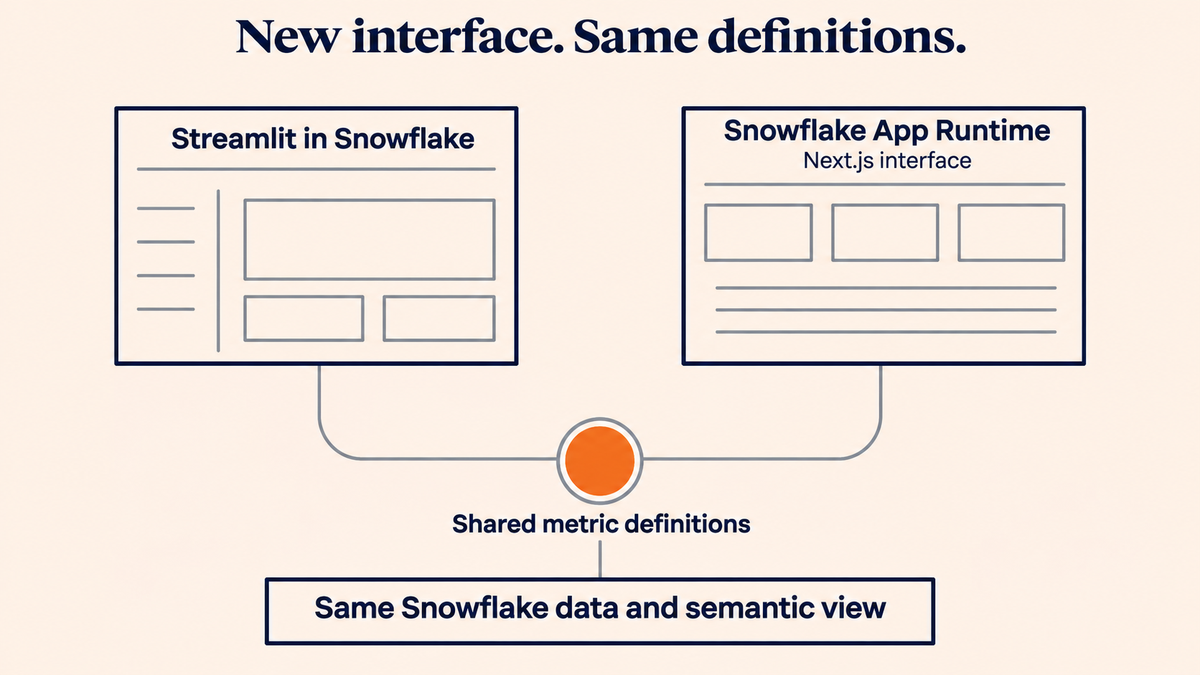
Moving a data app should not change what its numbers mean. I moved the Apache Ossie demo from Streamlit in Snowflake to Snowflake App Runtime to try a different interface around the same metric definitions. This walkthrough covers the Next.js rewrite, deployment and the authentication error I encountered.
In Same table, different revenue the demo answered one question twice: 115,550 without a semantic view, 103,200 with it. That demo ran as a Streamlit in Snowflake app. I have now moved it to Snowflake App Runtime, as a Next.js app that Snowflake builds and runs next to the data.
The numbers did not move. That was the point of the exercise. The Ossie YAML describes the intended definitions; the Snowflake semantic view implements the metrics queried by the app. Keeping those definitions outside the interface meant I could replace the interface without rewriting them.
This is a migration of a small demo, with five comparison questions. It is not a performance benchmark or a complete production migration. The code is in the Apache Ossie demo repository.
Why try a different runtime?
For this demo, the useful change was control over the interface: ordinary links, server-rendered pages and a custom layout. Streamlit had already made it easy to build the original data app. Moving to Next.js let me shape how readers navigate the explanation and share a particular comparison.
I would make that choice based on the application you need to build. If Python widgets already meet the requirement, keeping Streamlit avoids owning a separate web interface. Snowflake describes the distinction in its App Runtime overview: Streamlit offers a Python-first approach, while App Runtime supports custom web applications.
For me, the architectural question was whether the metric definitions would survive that change intact.
What changed
The SQL, the data and the semantic view stayed exactly as they were. Everything between the user and the query changed: one Python app file became a small Next.js project in app-runtime/.
| Concern | Streamlit in Snowflake | Snowflake App Runtime |
|---|---|---|
| Code | streamlit_app.py, one file |
Next.js: app/page.tsx, components/, lib/ |
| Connection | get_active_session() |
snowflake-sdk with the session token at /snowflake/session/token |
| Tabs | st.tabs |
Links: ?tab=about, ?tab=yaml, ?tab=compare |
| YAML section picker | st.radio |
Links: ?tab=yaml§ion=Metrics |
| Question picker | st.selectbox |
A GET form: ?tab=compare&question=… |
| Tables | st.dataframe |
Plain HTML tables |
| Charts | st.bar_chart |
A small SVG chart component |
| Rendering | Streamlit reruns the script | Server-rendered on each request (dynamic = "force-dynamic") |
| Definition | CREATE STREAMLIT over a stage |
app.yml |
| Deploy | PUT the file, then run 03_deploy_streamlit.sql |
snow app deploy |
| Access | GRANT USAGE ON STREAMLIT |
GRANT USAGE ON APPLICATION SERVICE |
| Local run | This connection path requires the Snowflake runtime | npm run dev with connections.toml |
Every state of the app is now a URL. That sounds minor. It made the app easier to test, to link to from a blog, and to record.
The steps
I did the rewrite with a Cursor cloud agent, working from the existing repo. The data prerequisites stayed the same: 01_setup.sql and 02_semantic_view.sql run first. To follow the deployment steps, you also need an account configured for App Runtime, a Snowflake CLI version that supports its version 2 manifest, and a role with the required deployment privileges. Follow Snowflake's account administrator setup before deploying into a new environment.
Use the repository version containing the OAuth authentication fix.
- Port the content. The text of the four explanatory tabs moved into
lib/content.tsandcomponents/sections.tsx. These tabs need no connection. - Port the comparisons. The five questions, each with its "without" SQL, its
SEMANTIC_VIEW()query and its row preview, became data inlib/scenarios.ts.lib/compare.tsruns them;lib/merge.tslines up both result sets per dimension. - Write the connection.
lib/snowflake.tsreads the session token when the app runs in Snowflake, and falls back toconnections.tomlor environment variables when it runs on a laptop. - Configure the build.
next.config.tssetsoutput: "standalone"and keepssnowflake-sdkout of the bundle. - Describe the app.
app.ymlnames the serviceOSSIE_DEMO_SARinOSSIE_DEMO.ECOMMERCE, usesCOMPUTE_WH, and lists the install, build and run commands:
version: 2

name: OSSIE_DEMO_SAR
database: OSSIE_DEMO
schema: ECOMMERCE
query_warehouse: COMPUTE_WH

label: Apache Ossie + Snowflake
description: How Apache Ossie metric context maps to a Snowflake semantic view.
icon: public/icon.svg
auto_suspend_secs: 900

ignore:
  - node_modules
  - .next
  - .env*
  - .git

install:
  commands:
    - [npm, ci]
build:
  commands:
    - [npm, run, build]
    - [mkdir, -p, .next/standalone/.next]
    - [cp, -r, .next/static, .next/standalone/.next/static]
    - [cp, -r, public, .next/standalone/public]
run:
  command: [node, .next/standalone/server.js]
The static-file copy commands matter here: they place the Next.js assets and public/ files alongside the standalone server. The repository manifest is the complete configuration for this demo.
- Deploy. From
app-runtime/, runsnow app deploy. Snowflake installs, builds and starts the app. - Grant access. The repository includes
06_deploy_app_runtime.sql. For access limited to the demo role, grant service usage as below. That role also needs usage on the parent database and schema:
GRANT USAGE ON APPLICATION SERVICE OSSIE_DEMO.ECOMMERCE.OSSIE_DEMO_SAR
  TO ROLE OSSIE_DEMO_ROLE;
The repository script also grants service usage to PUBLIC. Review that broader grant before running the whole script in your own account.
- Open it.
snow app open, or the app's own URL. Viewers sign in through Snowflake. See the App Runtime getting-started guide for deployment and sharing details.
For a local run, use npm ci and npm run dev from app-runtime/, with credentials supported by this project's connection helper. Its local path supports username/password settings from environment variables or connections.toml; do not assume it supports every Snowflake CLI authentication method.
The snag: one line in the connection
The first deploy looked fine. Four tabs rendered. With vs Without, the only tab that queries Snowflake, showed this for every query:
Run 01_setup.sql and 02_semantic_view.sql first so both queries can run.
Error: The user you were trying to authenticate as differs from the user
tied to the access token.
The first sentence is the app's own fallback message, and it points the wrong way. The tables and the view were there. The second sentence is the real error.
In App Runtime the app logs in with an OAuth token that Snowflake writes to /snowflake/session/token. The token carries the service identity. The connection code also sent a username, and since none was set in the runtime it fell back to a placeholder:
if (token) {
  options.authenticator = "OAUTH";
  options.token = token;
  options.username = user || "snowflake-app-runtime"; // the bug
}
Snowflake compared that name with the token's user and refused. In this OAuth branch, the fix was to remove the explicit username:
if (token) {
  options.authenticator = "OAUTH";
  options.token = token;
}
Snowflake documents the session-token path and token rotation in its runtime environment guide. The helper reads the token when it creates a connection. After a redeploy, the tab showed 115,550 and 103,200 again.
The lesson for anyone porting from Streamlit: get_active_session() hid all of this. In App Runtime the connection is your code, so check the login path before you trust the error text around it.
Signing in is different from choosing query permissions
Opening an authenticated app does not automatically make every SQL statement run as the viewer. In this demo, the comparison calls use the helper's default service identity. The helper also contains a caller-token path, but the comparison calls do not enable it.
For an application with different data access per viewer, decide that execution context explicitly. Snowflake's query access documentation distinguishes owner's rights from restricted caller's rights, including the caller grants required for the latter. Keeping metric definitions stable and preserving user-specific access are separate checks in a migration.
Same definitions, new interface
The App Runtime version returns the same answers as the Streamlit version, question for question. That is the whole argument of the first post, tested from the other side: the definition lives with the data, so the front end is replaceable.
| Question | Without a semantic view | With the semantic view | Difference |
|---|---|---|---|
| Total Revenue by Region | 115,550 | 103,200 | 12,350 |
| Revenue by Product Category | 251,250 | 113,500 | 137,750 |
The second row is the join trap from the first post. The naive query joins order_items and sums orders.total_amount once for every line. The semantic view names line_revenue and sums line totals instead. That metric has no completed-order filter, whereas total_revenue does. The two rows therefore illustrate different definitions; their semantic totals should not be expected to match.
The walkthrough video covers all five tabs, every YAML section and all five questions. The URL parameters also make individual views easier to open directly.
Watch it: Apache Ossie demo on Snowflake App Runtime (video, about 2 minutes).
What I would tell you before you move
- Keep the contract out of the app. The app still contains comparison SQL and presentation logic. The named metric expressions queried through the semantic view stayed in Snowflake. If those expressions had lived only in Python, the rewrite would also have involved porting business definitions.
- Budget for the widgets. Streamlit supplies tabs, pickers, tables and charts as built-in components. In Next.js each one is yours to write; here that meant a GET form and a small SVG chart.
- Own the login path. Keep the OAuth connection consistent with the service token, and choose the query execution context explicitly.
- Make state a URL. Server-rendered pages with query parameters were simpler than client state, and they pay off in testing and recording.
- Keep both while you compare. The repository retains the Streamlit implementation. Compare all five questions, dimension values and filters before treating the new interface as equivalent. Additional local extensions are outside the scope of this five-tab port.
The code is in the apache-ossie-demo repo, with the App Runtime version under app-runtime/.
The warehouse still knows the amounts. The contract still decides which one is revenue. Only the window around it changed.
Code and further reading
- Same table, different revenue (daanalytics.nl, 3 Nov 2026)
- apache-ossie-demo on GitHub
- CREATE SEMANTIC VIEW (Snowflake docs)
- Apache Ossie
Transparency note: AI assisted with restructuring, editing and checking the article against repository code and Snowflake documentation.